Backing Pad Selection & Why Your Disc Wobbles
A wobbling, gouging, one-sided disc is almost never the disc. It's the pad under it, or the way it's mounted — and you can't buy your way out of it with more discs.
When a disc wobbles, chatters, gouges, or wears heavy on one edge, the reflex is to blame the abrasive and order a different brand. Wrong target. Discs leave the press flat and concentric — they don't grow a wobble on their own. Runout comes from what sits between the disc and the spindle: the backing pad, the flange, the lock nut, and how clean and square that stack is. This is the hardware layer every disc guide assumes and none of them cover.
It's Almost Never the Disc
A flat, balanced disc mounted on a clean, matched, properly torqued pad runs true. Change one of those variables and it doesn't. The usual culprits, in order of how often they're the real problem: debris trapped under the pad or flange, a worn or wrong-durometer backing pad, a pad mismatched to the disc type, and a lock nut that's over- or under-torqued. Fix the hardware and the "bad disc" cuts straight. Keep buying discs and you'll keep chasing a problem the pad is causing.
Firm vs. Soft Pads: Durometer and What It Does
Backing pads have a durometer — a hardness rating — and it's not a minor spec. It sets how the disc cuts.
Firm / hard pad
Holds the disc flat and rigid. Cuts aggressively, keeps a flat plane, works cleanly to an edge — the right choice for stock removal and flat panels. Put it on a curve and it gouges, because it won't let the disc follow the contour.
Soft / flexible pad
Lets the disc conform to curves and contours. Gentler cut, blends and follows shape — the right choice for finishing and curved work. Push it into flat, aggressive grinding and the disc rolls its edge: you lose cut, control, and disc life.
Match durometer to the job, not to habit: flat and aggressive wants firm; contour and finish wants soft. A gouge on a curve or a rolled edge on a flat isn't a disc defect — it's the wrong pad hardness for the work.
Matching the Pad to the Disc Type
The pad has to match the disc system, not just the diameter. Resin fiber, flap, quick-change, and surface-conditioning discs each mount differently and want a specific backer. This is the decision every disc article assumes — mount the wrong pad and the best disc in the catalog runs badly.
- Resin fiber discs — mount on a firm, ribbed backing pad with a lock nut, sized slightly smaller than the disc so the abrasive edge does the work. A ribbed pad with airflow holes runs cooler under load; a worn or flat-faced pad is the first thing to replace when a fiber disc wobbles. Pro-Graad's 7″ ribbed rigid backing pad is built for exactly this — see the fiber disc guide for where fiber fits versus flap and non-woven.
- Flap discs — self-backed: the flaps are mounted on a fiberglass or plastic backing plate, so there's no separate pad. The equivalent selection is the backing-plate geometry — flat (T27) for flush work, conical (T29) for edge and contour. The flap disc selection guide covers that call.
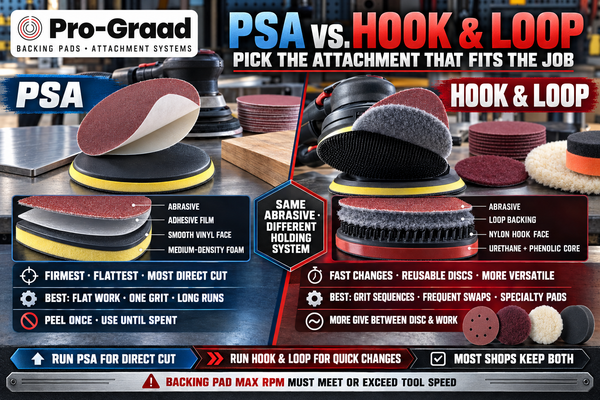
- Quick-change discs (Type R / TR / TS) — the holder is the backing pad. It has to match the disc's attachment type, and its firmness sets the cut the same way a fiber pad's does. The quick-change systems guide decodes which disc locks onto which holder.
- Strip & surface-conditioning discs — run on a firm backer or a quick-change holder depending on format; too soft a backer lets an open strip disc flex and grab. See strip discs for paint removal for the matching there.
Diameter and Overhang: The Wobble Multiplier
Pad diameter and disc overhang drive runout more than almost anything else. The backing pad should sit slightly smaller than the disc so the abrasive edge — not the pad rim — contacts the work. But there's a limit: too much unsupported disc hanging past the pad flexes, chatters, and folds under load, and that flex reads as wobble while it chews the edge off the disc.
Go the other way and a pad that's too large contacts before the abrasive does, burnishing and loading instead of cutting. And a worn pad has quietly changed diameter — a rounded-off rim or a dished face no longer supports the disc where it used to. Runout scales with overhang: the more disc hanging unsupported past the pad, the worse it runs. Size the pad to the disc, and replace it when the face isn't flat and the rim isn't sharp.
Mounting Errors: Torque, Debris, and the Lock Nut
Most "wobble" is a mounting error you can fix in thirty seconds without a new disc.
Debris under the pad
A chip, a burr, or a curl of old disc trapped between the pad and the flange tilts the entire stack. It doesn't take much — a fraction of a millimeter of grit cocks the disc off-axis and it wobbles for the rest of its life. Wipe the flange and the pad face clean at every disc change. This is the single most common cause of runout, and the easiest to miss.
Lock-nut torque
Over-torqued, and you warp a plastic or fiber backing pad — or dish the disc — into permanent runout. Under-torqued, and the stack shifts and spins eccentric. Snug and fully seated, not gorilla-tight and not finger-loose.
Wrong flange or orientation
Skipping the backing flange, using the wrong adapter, or forcing a directional pad on backward all seat the disc off-plane. If the stack won't sit flat by hand, it won't run flat under power.
Failure Modes: Gouging, One-Sided Wear, and Blaming the Disc
Three signatures, all pointing back at the hardware:
Wobble and runout
Dirty flange, worn pad, or bad torque. Pull the disc, clean everything, seat it flat, re-torque. Ninety percent of the time it's gone. Not the disc.
Gouging and digging
Pad too hard for the contour, or too much overhang letting the unsupported edge dig. Drop to a softer durometer or size the pad closer to the disc.
One-sided, uneven wear
The disc is running tilted — a worn pad, trapped debris, or a bent flange holding it out of plane. It wears fastest where it's canted into the work. Fix the mount and the wear evens out.
If you're burning through discs and blaming quality, pull the pad and inspect the flange before you file a complaint. The disc is almost always the victim of a bad mount, not the cause. A five-second flange wipe fixes more "defective discs" than any brand change.
FAQ
Why does my grinding disc wobble?
Almost always the hardware, not the disc. Check for debris trapped under the backing pad or flange, a worn pad, and lock-nut torque. Clean the flange, seat the pad flat, snug the nut — the wobble usually disappears.
What durometer backing pad do I need?
Firm for flat, aggressive stock removal and working to an edge; soft for contours, curves, and finishing. The wrong hardness shows up as gouging (too firm on a curve) or lost cut and rolled edges (too soft on flat work).
Should the backing pad be the same size as the disc?
Slightly smaller, so the abrasive edge contacts the work — but not so small the disc overhangs and flexes. Too large a pad burnishes; too much overhang causes chatter and edge wear.
My disc wears out on one side — is it defective?
Rarely. One-sided wear means the disc is running tilted — a worn pad, debris under it, or a bent flange holding it out of plane. Fix the mount and the wear evens out.
How tight should the lock nut be?
Snug and fully seated, not overtightened. Too tight warps the pad or disc; too loose lets the stack run eccentric. Both cause wobble.